Amazon Connect (Next-Gen, Mar 18, 2025): Architecture & Provisioning Deltas
8/4/2025
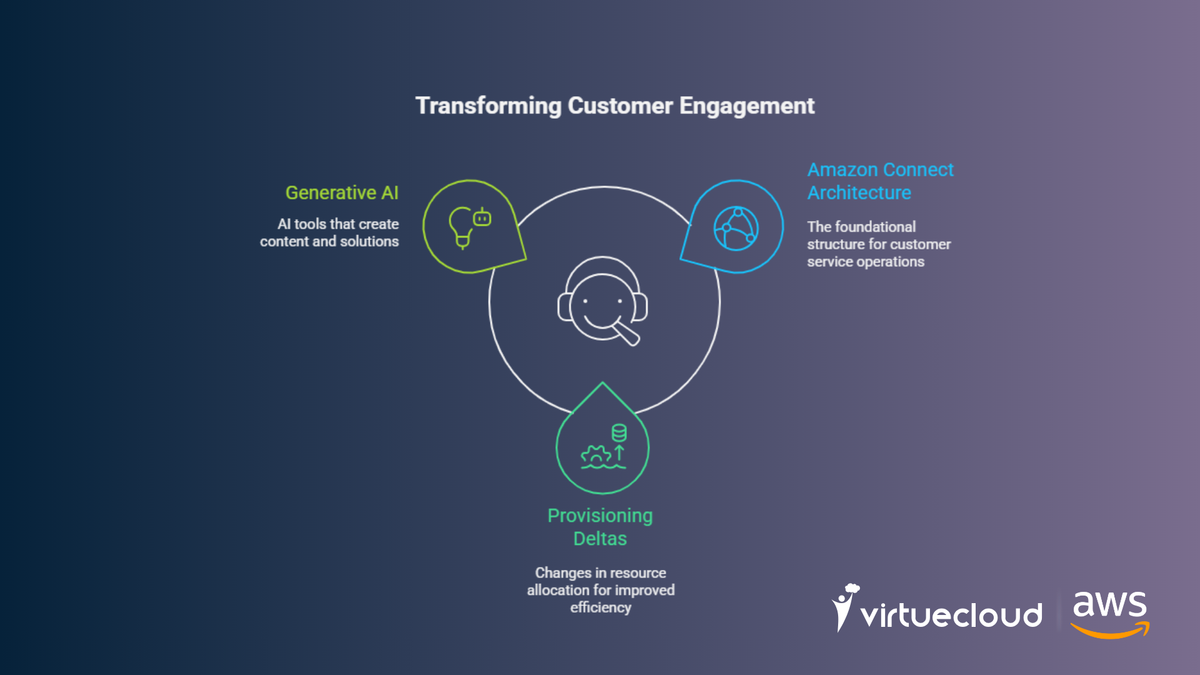
What changed (official): Amazon Connect now delivers first-party AI across all channels with an “all-you-can-eat” AI model: pricing is tied to channel usage, not AI consumption. This bundles capabilities such as Contact Lens (incl. analytics, transcription, redaction, QA, screen recording), agent assistance (Amazon Q in Connect), summaries, forecasting & scheduling (WFM), etc., under the Connect service’s per-channel charges (telephony/comms remain separate).
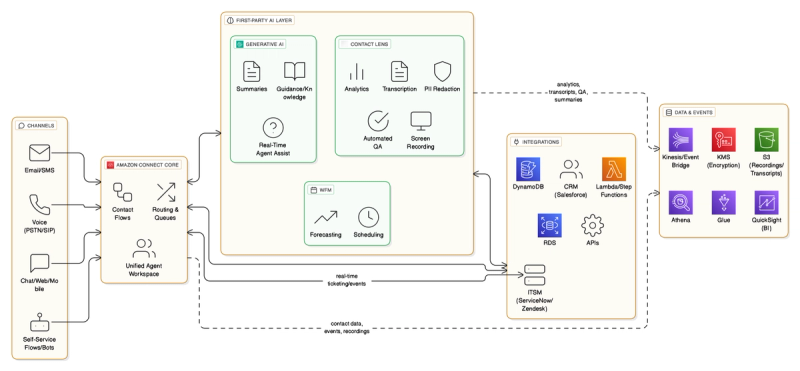
Next-Gen Amazon Connect Architecture: Unified Channels, Native AI, and Simplified Integrations
- Channels: Voice (PSTN/SIP), Chat/Web/Mobile, Email/SMS, and first-party self-service flows/bots feed into Amazon Connect Core (routing, queues, contact flows, unified agent workspace).
- First-Party AI Layer (bundled):
- Contact Lens: analytics, transcription, PII redaction, screen recording, automated QA.
- Generative AI: summaries, guidance/knowledge answers (Amazon Q in Connect), real-time agent assist.
- WFM: forecasting & scheduling.
- Data & Events: S3 (recordings/transcripts/screen captures), Kinesis/EventBridge (contact events), KMS (encryption), Athena/Glue/QuickSight (reporting/BI).
- Integrations: CRM/ITSM (Salesforce, ServiceNow, Zendesk), Lambda/Step Functions, DynamoDB/RDS/APIs.
The big shift: AI features are native and consistently available across channels without per-feature AI metering, you plan capacity by channels, not by “how much AI.”
Provisioning changes vs. “classic” Connect
1) Pricing & scoping (Plan phase)
- New reality: Budget and forecast per channel (voice, chat, email, SMS, etc.); do not create separate line items for AI interactions/summaries/assist. Telephony and other communication costs are still separate.
- Action: Update TCO calculators, FinOps dashboards, and chargeback models to attribute AI benefits under channel usage, not per-AI unit. (We’ve already updated our calculators/templates.)
2) AI features (Enable, don’t “bolt-on”)
- Contact Lens: Turn on analytics + screen recording (new in the default AI bundle), configure KMS keys, S3 buckets & lifecycle, and PII redaction policies.
- Agent Assist / Amazon Q in Connect: Enable generative features for guidance and auto-summaries in the Agent Workspace; map access to knowledge sources (FAQs/KBs/CRM).
- WFM (forecasting & scheduling): Activate built-in forecasting/scheduling instead of third-party modules where possible.
3) Architecture simplification
- Fewer third-party AI dependencies: Replace external QA, summarization, and assist engines with first-party features in Connect. This reduces API hops, secrets/keys, and failure domains. (Industry press and AWS positioning emphasize simplification and cost predictability.)
- Unified channel behavior: Provision omnichannel flows with consistent AI policy, the same AI stack serves voice & digital without per-channel add-ons.
4) Data, security, and compliance
- S3 & lifecycle: Size for screen recordings + transcripts growth; set lifecycle to Glacier as needed.
- KMS: Centralize keys for recordings, transcripts, and Contact Lens artifacts; rotate per policy.
- Contact events: If you stream contact events, verify Kinesis/EventBridge throughput for higher AI metadata volume (summaries, QA, analytics).
5) Operations & observability
- Agent workspace config: Expose AI insights, summaries, and next-best actions; define guardrails and redaction scopes.
- Reporting: Point Athena/QuickSight to the enriched artifacts for QA coverage, compliance, and coaching dashboards.
“Before vs After” (at a glance)
| Area | Classic Provisioning | Next-Gen Provisioning |
|---|---|---|
| AI cost model | Fragmented (per feature/integration) | Bundled with channel usage (“all-you-can-eat” AI) Amazon Web Services, Inc. |
| AI capabilities | Mix of first/third-party, uneven across channels | First-party across all channels: Contact Lens, Q in Connect, WFM, QA, summaries Amazon Web Services, Inc. |
| Integrations | Extra vendors, APIs, keys | Native; fewer moving parts, simpler IAM/KMS |
| Storage | Recordings + occasional transcripts | Recordings + transcripts + screen capture + QA artifacts (adjust S3/KMS/lifecycle) Amazon Web Services, Inc. |
| Forecasting & scheduling | Often external WFM | Built-in WFM with forecasting/scheduling Amazon Web Services, Inc. |
| Ops dashboards | Basic metrics | Enriched analytics & summaries feed to BI (Athena/QuickSight) Amazon Web Services, Inc. |
VirtueCloud rollout (what we did post-announcement)
- Ref-arch update: Published the above AI-first Connect blueprint with S3/KMS/Kinesis and CRM hooks (Salesforce/ServiceNow/Zendesk).
- Templates: Ready-made Contact Lens + Agent Assist templates with PII redaction, auto-summaries, and QA scoring out-of-the-box.
- FinOps: Upgraded cost models to channel-based AI accounting; benchmarks for storage growth (audio + screen).
- Delivery playbooks: Cut average go-live time by removing third-party AI glue, fewer integrations, faster UAT. (Press and AWS guidance align with this simplification theme.)
Quick migration checklist
- Enable Contact Lens (incl. screen recording) and configure KMS + S3 lifecycle.
- Turn on Amazon Q in Connect (agent assist + summaries) and wire to knowledge sources.
- Activate WFM; validate forecasts vs historical volume.
- Update Event streaming (Kinesis/EventBridge) for higher metadata throughput.
- Refresh FinOps dashboards for channel-based AI accounting; keep telephony cost lines separate.
- De-scope third-party AI where redundant; reduce keys, secrets, and failure points.